Command Line Rainbow
Hi again! In this post I’ll explain some code that I’ve developed to mess with the cmd colours on windows.

The funciton of the script is mainly to draw kind of a rainbow, and it adapts to every window size. I’ll be using two separate files for this :
- rainbow.bat
- parse.pl
The
.batextension is used for batch files, which are, in short, “shell scripts for the windows cmd”. This excellent page will teach you everything you want to know and much more (for real, those people are crazy).
The.plextension is the one used for Perl scripts. If you are interested in learning the language, you can visit this site.
rainbow.bat
Let’s brake down this script in two parts : obtaining the number of columns that the window has (A.K.A. how many characters fit in one line) and displaying the rainbow.
Number of columns
To check the number of columns that the window is using, the command mode will be very useful. The documentation of the command is here.
With mode con we can output some info about the size of the window. It’s been very useful to me to redirect this info into a temporary separate file ModeTemp.txt (it will be deleted when the process ends) in order to parse it afterwards with parse.pl, but I’ll get into the parser later. For now, let’s just assume that we can obtain the number of columns with the other script.
mode con >> ModeTemp.txt
Once obtained, the number of columns has to be assigned to a variable so that it can be used later on. This seems trivial, but it is definetly not when the scripting language is batch.
To accomplish this variable assignment, it is required to loop through the parser’s output, which will be in stdout. When the loop is finished, the variable cols will be set to the last line that was read.
for /f "tokens=*" %%a in ('perl parse.pl') do (
    set cols=%%a
)
Some pretty detailed information about how this for /f works can be found here.
Displaying the rainbow
Here is where the real magic happens. I’ll have to break this down into different sections once again so that it can be well understood :
The first thing I’m doing after obtaining the columns is checking if the number is odd or even. This step will let me add a “speed feature” by echoing either one or two “coloured spaces” on each loop iteration.
set /A mod=%cols% %% 2
if %mod%==1 set /A cols-=1
When loop ends :
if %mod%==1 echo [%a%m [0m
In case the number is even, no changes are required because by echoing 2 characters at a time, we’ll reach the end of the line.
However, if it is an odd number and no modifications are made, the whole line + 1 character will be echoed whenspeed=2, thus colouring the next line.
The required change in this last case is pretty simple, when the number of columns is odd, substract 1 to it and echo outside of the loop.
Let’s now get to this famous loop:
To be able to make a determined amount of iterations in batch, one option is to loop through a range with for /L. Once again, for more info look at this website.
Depending on the “speed” (that we obtain through stdin), each iteration will either echo 1 character cols number of times, or 2 characters cols/2 number of times.
There is one more thing to be understood before looking at the code : how do you use colours? cmd can display colours thanks to ANSI sequences, which you can learn more about checking out this page.
for /L %%n in (1 %speed% %cols%) do (
if %speed%==1 echo | set /p="[%a%m [0m"
if %speed%==2 echo | set /p="[%a%m [0m"
)
set /A a+=1
if %a%==47 set /A a=41
The variable
ayou can see is used to modify the colour, once an entire line is printed in<ESC>[%a%m,ais incremented and the loop starts back again, now with the coloura + 1.
You may be asking yourself where is this loop re-started with a different color, and you’re right, let’s get to that :
In batch file there exist these things called labels, which you can think of as kind of a checkpoint, you can use go to <label> and the program will execute the code that is under that label.
The name of the only label I use in the script is colorLoop, and it is what lets us go back to the beginning of the loop with a different value of a every time.
Here you can see the full code of rainbow.bat :
@echo off
set /A a=41
mode con >> ModeTemp.txt
set /p speed="Select speed : [1/2]"
for /f "tokens=*" %%a in ('perl parse.pl') do (
set cols=%%a
)
set /A mod=%cols% %% 2
if %mod%==1 set /A cols-=1
del ModeTemp.txt
:colorLoop
for /L %%n in (1 %speed% %cols%) do (
if %speed%==1 echo | set /p="[%a%m [0m"
if %speed%==2 echo | set /p="[%a%m [0m"
)
if %mod%==1 echo [%a%m [0m
set /A a+=1
if %a%==47 set /A a=41
goto :colorLoop
In case you’re wondering,
@echo offis used to turn off echo, this way the commands won’t be displayed through the terminal
parse.pl
As promised, it is now time to review the parser. First of all, I have created it in Perl because it provides a great support for regular expressions, but it could have been done in other languages. This time, I’ll show the full code and then I’ll try my best to explain it :
#!/usr/bin/perl

use warnings;

open(FH, '<', 'ModeTemp.txt') or die $!;

while(<FH>){
   print $1 if $_ =~ /Columns:\s*(\d\d*)/;
}
close(FH);
Firstly, the program is told which interpreter to use, in this case perl.
Probably perltutorial will explain the I/0 file part better than me, so I strongly advice to read the linked page. It is only 5 minutes, you can do that instead of going to the kitchen for some cookies (actually, the optimal is to do both).
In order to understand the regexp (regular expressions) that I have used, it is first a good choice to look at the output of the mode con command, since that is what the script is parsing :
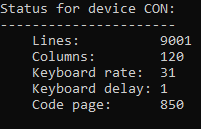
The interesting line is the one with “Columns : x”, so that is what the parser will get :
print $1 if $_ =~ /Columns:\s*(\d\d*)/;
In this piece of code, I’m telling the program to print the extracted pattern only if the line it is reading matches the full pattern /Columns:\s*(\d\d*)/, which can be explained by looking at each part :
Columns:is simply the exact string that will match\s*means 0 or more occurrences of a blank space, tab, etc. (\sis the character and*is for saying “0 or more times the preceding expression”)\d\d*means one digit, and then zero or more digts after that.
Obviously, the only line that matches this whole pattern is the Columns line, and therefore we are capable of obtaining the number through the $1 variable, which stores the part inside the () of the pattern. More on Perl extracting matches from regex.
If you want to try this little script out, you can have a look at my github repo. Thanks for reading me! :)