Password security and how to choose passwords
More and more security breaches are beign exposed these days, and some of these lead to catastrophic outcomes such as password leakages, in which the users’ passwords are made public or shared.
In this post I’ll cover what are the best practices to make when choosing a password, and how to manage all the passwords for all of your accounts.
First of all, I’ll address how to deal with passwords for the average user, and afterwards I’ll get into some detail of which attacks can be performed, the math involving password strength, and some extra tips to make your account security more robust.
1 - Dealing with passwords
Let’s get onto it, the three factors that affect the strength of your password are the following :
- Length of the password
- Character set that will be used
- Predictability
To get more into detail, you can keep reading and discover which kind of attacks can affect you and what the math behind password security is, but if you only want to have secure passwords and skip all of the geeky information, these are the guidelines to follow :
- Password must be more than 8 characters long.And you have to know that this is the limit for today’s computing power, but this number increases with time, so I would go for something like 15+ characters to make sure I’m safe.
- It needs to include some number, symbol and capital letter.
- It must not be related to you (e.g. your favourite team, your birthday, etc.) and it can’t be composed of common words such as
passwordorhello. - It isn’t a good idea either to take a password and use some permutation of it, such as substituting letters for numbers as in
h3ll0w0rld, this will be the first idea an attacker will come up with when performing a dictionary attack (which you can learn about down below).
Some extra thing that you should take into consideration when choosing your password is the convenience of remembering and typing it. So for example, QrN}x#hCyBQ7t2)> is a great password in terms of robustness, but it is really hard for humans to remember random character strings, and a pain to type every time you want to access something.
To put it in a nutshell, you want a strong, easy-to-remember password. My tip (and this is what most specialist will say) is to think of it as a passphrase instead of a password, by combining multiple characters that are easy to remember, but long and random enough to be secure.
Some examples of great passwords are :
My_Friend/Has50%ofMyIQ>:)Alan$Tu#ringW@sNOTEWORTHY
Password Managers
With all of this said, I’d like to introduce you to password managers, which consist of applications that create and store an encrypted database of your different passwords. A password manager will keep all of your passwords safe and you will only need to remember the master password to access the database. This is increcibly helpful since it opens the possibility to have randomly generated passwords for all of your accounts, such as chm(6PM@d+dHHT%q. This way, you only need to follow the convenience guideline I just mentioned above when selecting your master password, and use a website such as passwordsgenerator.net to generate all of your other passwords (you won’t need to remeber them since they are stored permanently and securely).
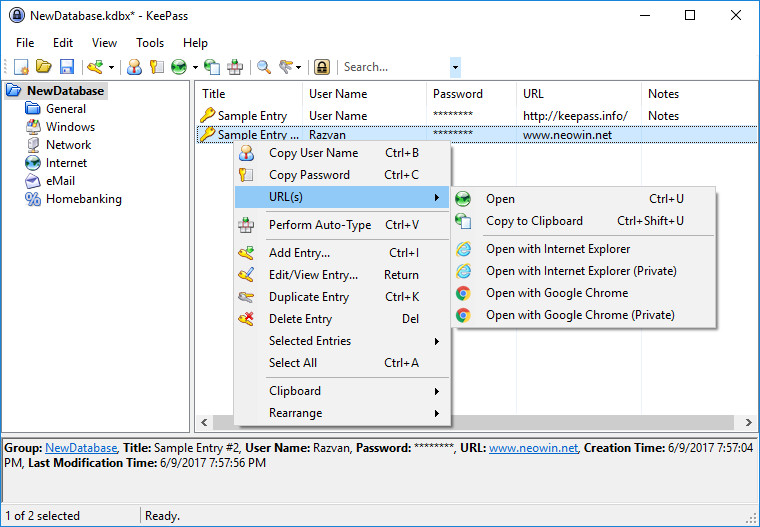
As a last tip for the average user : NEVER RE-USE PASSWORDS. For real, do not ever use the same password for more than one site, each site handles its security differently, and if you use the same password for a dubious website that can have a security breach and for your Amazon account, well, you don’t need me to tell you what will happen.
2 - Types of attacks
To know how passwords can be cracked, first you need to learn how they are stored. The most common way (and the most secure one) passwords are stored inside a company’s database is with a hash of the password.
A hashing function or algorithm is a mathematical function that is easy to calculate in one way, but nearly impossible to undo, it converts a random input into a fixed-length output.

What this does is allowing passwords to be stored in a form that is by all means different from their original one, and it makes it impossible for someone who sees this hash to guess what the original password was.
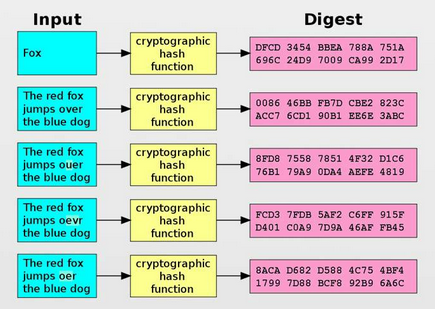
In conclusion, if you hash the same input twice, you will get the same output, but if you have the output of the hashing function (A.K.A. the hashed password) you cannot obtain the input. Therefore the way of guessing a password is by hashing some string and comparing this hash to the hash of the original password (provided the attacker has somehow obtained the password hash), if the hash of the string matches with the hash of the password, then the string is the password (I will not discuss hash collisions in this post but you can do further research since it is a very interesting topic). This hash comparison is the same procedure that takes place when you enter your password to log in to a site, it calculates the hash of what you entered, and compares it to the hash stored in the site’s database. This means that the attacker can directly try combinations of characters in the log in form of the site without needing to calculate hashes if the website doesn’t have any protection against brute force attacks.
Getting deeper into detail, let’s break down what kinds of attacks you can fall victim of :
- Brute force attack
- Dictionary attack
Brute forcing
What a pure brute force attack consists of, is essentially trying every single combination possible until access is granted. This means trying the combinations :
- a
- b
- ...
- aa
- ab
- ac
- ...
- aaa
- aab
- aac
- aad
- ...
This process might seem endless, but since it is a computer and not a human who will be taking care of it, it can literally take seconds to crack a password if the password isn’t long enough and the character set doesn’t fit the broadness requirements.
Dictionary attacks
These kind of attacks are a variant of the brute force ones, they also consist of trying many combinations, but this time the combinations won’t be every possible string, they will be carefully selected from a list of common words and patterns taken from lists of previously leaked passwords, common english words, etc. This is why unpredictability of our passwords is of huge importance. Furthermore, attackers can and will do some research on what you like, who you follow, etc. and craft their own wordlists to attack you, I hope this makes you see how important it is to have a password completely unrelated to your insterests or personal data.
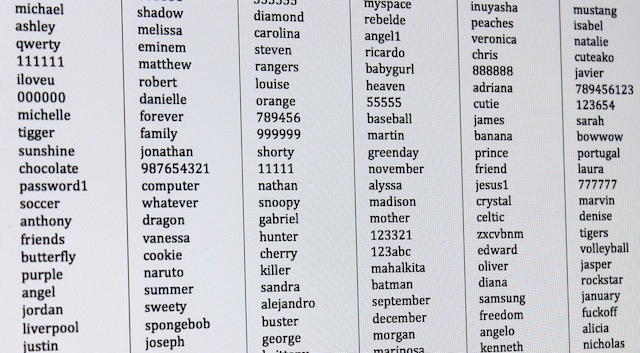
Once again, millions of combinations can be tried in seconds, so it’s not about trying to get fancy with passwords such as “adam12354” instead of “adam12345” (which by the way is a terrible password since it doesn’t meet the length, character set or predictability requirements).
3 - Math
This will probably be the most intense section of the post, by reading this you’ll learn to compare the strength of different passwords and the number of combinations that an attacker has to try in order to crack your password.
Entropy
To talk about password robustness, a little insight into the concept of Shannon’s entropy shall be made. In information theory, entropy is, by definition, the average level of information or uncertainty that a process can output. For example, The entropy of the result of throwing a biased coin will be lower than that of a normal coin, because the outcome we’re expecting from the biased coin is easier to guess before the coin has been thrown. Entropy is calculated through the formula :

Thus a standard’s coin entropy is H = 1 because p = 1/2 and (1 - p) = 1/2 (being p the probability of heads and (1 - p) the one of tails), while a biased coin entropy will be something between 0 and 1, depending on p.
To calculate the entropy of a password, we can take the number of characters in the selected character set and call this c, and the length of the password, and call it l.
Then the entropy would be :

As far as password selection concerns, the importance of entropy is that we can calculate the amount of combinations that the attacker has to try in order to crack the password.
Statistically, it only takes half of all the possible combinations to find a match (a hash collision) and hence crack the password, and the amount of total combinations can be calculated with the following formula :

This clearly shows that the more entropy, the more secure our password will be.
XKCD does an incredible job summarizing this topic in here.
Let’s look at the strength of some examples with length of l = 13 characters and different character sets :
-
Using only numbers :
c = 10
Entropy =37.00
Attacker needs to try6.87E+10combinations -
Using only letters :
c = 26
Entropy =96.21
Attacker needs to try4.58E+28combinations -
Using all keyboard characters :
c = 94
Entropy =347.84
Attacker needs to try2.57E+104combinations
As you can see, including symbols, capital letters and numbers drastically increases the number of attempts that the attacker needs to do, this is why it is so important to follow the guidelines stated at the beginning of the post.
Attack rate
Until this point, I have talked about an attacker being able to try many combinations in a matter of seconds, but how many of them can they exactly run?
I’m sorry to tell you that this question doesn’t have an easy answer, since this speed totally depends on the attacker’s computer and the number of iterations that the hashing algorithm requires to obtain a result. What is for sure, is that it takes less time to crack a password everyday, due to the pace at which technology evolves nowadays, so it is always better to be safe than sorry and add that extra lentgh to your password.
As we’ve just seen, we cannot estimate how much time it would take an attacker to crack a password without knowing his equipment, but what we can do is make our password as secure as possible by making sure it does have a high entropy.
4 - Extra tips
If you have arrived at this point, I can assume that you are concerned about your online privacy and security, and I will give you one more tip to enhance the safety of your accounts : use multi-factor authentication whenever it is possible.
MFA (Multi-Factor Authentication)
All of this post has been about passwords’ vulnerability to being cracked, but what I haven’t talked about is that passwords can be stolen. There are several ways to do this via malware (keyloggers, camfecting, etc.) or with social engineering (tricking you into telling someone your password).
The good news is that MFA solves this problem. MFA will ask you to provide more than one piece of information to access whatever you’re trying to access. It will usually ask for some code sent to your phone, a fingerprint, or some other way of identifying you, which will completely deny access to someone who has stolen your password. It can be annoying sometimes, but it is definetly worth it to use, specially if you have some important data that you want to keep safe.
This has been all for today, thank you guys for reading me and see you next time!